Maybe I can clarify a little. DVI-A (Analog) and DVI-D (Digital) both use the same connector but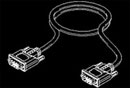 diffrent pins to transmit the signal. A DVI-I cable is a DVI cable with both the analog and digital pins. (so if you plug it into an analog device it will function as a DVI-A cable, vis versa if you plug it into a digital device it will function as a DVI-D cable). DVI-A and SVGA are one and the same, just a diffrent connector type. Most video cards (if not all at this point) have DVI-I connectors on them giving you the choice to use either analog or digital (you choose by pluging in either an analog or digital cable). This leaves most people
 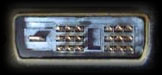 thining a DVI-I cable will be the right cable since it does everything, but in reality it doesn't always work this way. Lots of Digital devices will not leave the pin holes for the DVI-A connection (I assume this is to make sure the user uses the proper cable). So while in theory a DVI-I should work, in real life it will not. This is why we reccomend customers buy the proper cable for the application rather than a "one
 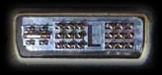 size" fits all. Hope this clears up some confusion. You can always take a look at http://www.dvihdmicables.com/ - Lots of good info there. DVI-D to DVI-D is the cable to use.
diffrent pins to transmit the signal. A DVI-I cable is a DVI cable with both the analog and digital pins. (so if you plug it into an analog device it will function as a DVI-A cable, vis versa if you plug it into a digital device it will function as a DVI-D cable). DVI-A and SVGA are one and the same, just a diffrent connector type. Most video cards (if not all at this point) have DVI-I connectors on them giving you the choice to use either analog or digital (you choose by pluging in either an analog or digital cable). This leaves most people thining a DVI-I cable will be the right cable since it does everything, but in reality it doesn't always work this way. Lots of Digital devices will not leave the pin holes for the DVI-A connection (I assume this is to make sure the user uses the proper cable). So while in theory a DVI-I should work, in real life it will not. This is why we reccomend customers buy the proper cable for the application rather than a "one size" fits all. Hope this clears up some confusion. You can always take a look at http://www.dvihdmicables.com/ - Lots of good info there. DVI-D to DVI-D is the cable to use.


 Posts
Posts

